Legacy Software Modernisation

e20 Solutions rebuilds old desktop applications and unsupported databases as secure, modern web-based software, keeping the processes your team relies on and moving your data across safely. Outdated systems slow a business down and put its data at risk.

  • Every record migrated
  • Phased, low-risk switchover
  • Secure, UK-hosted
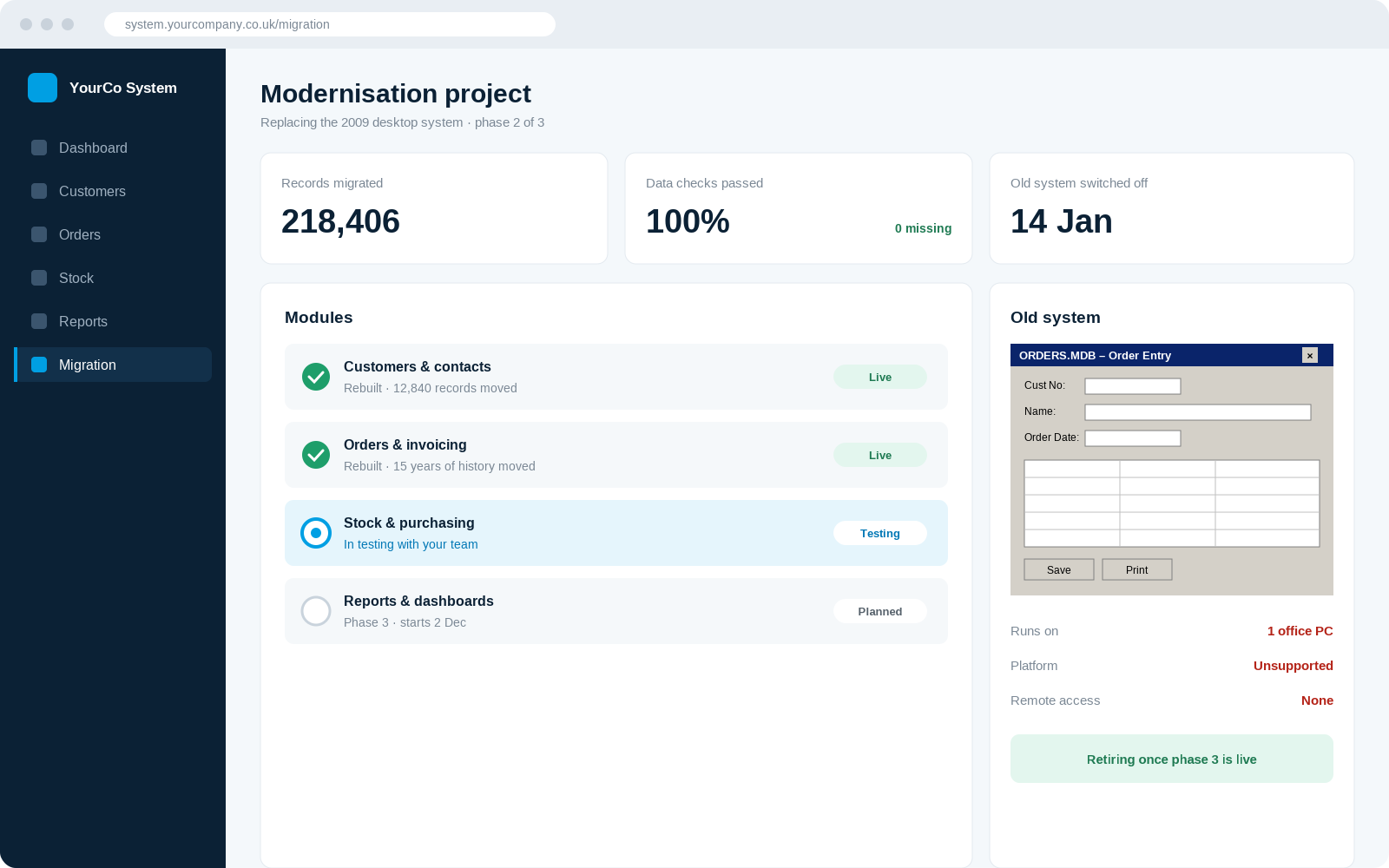
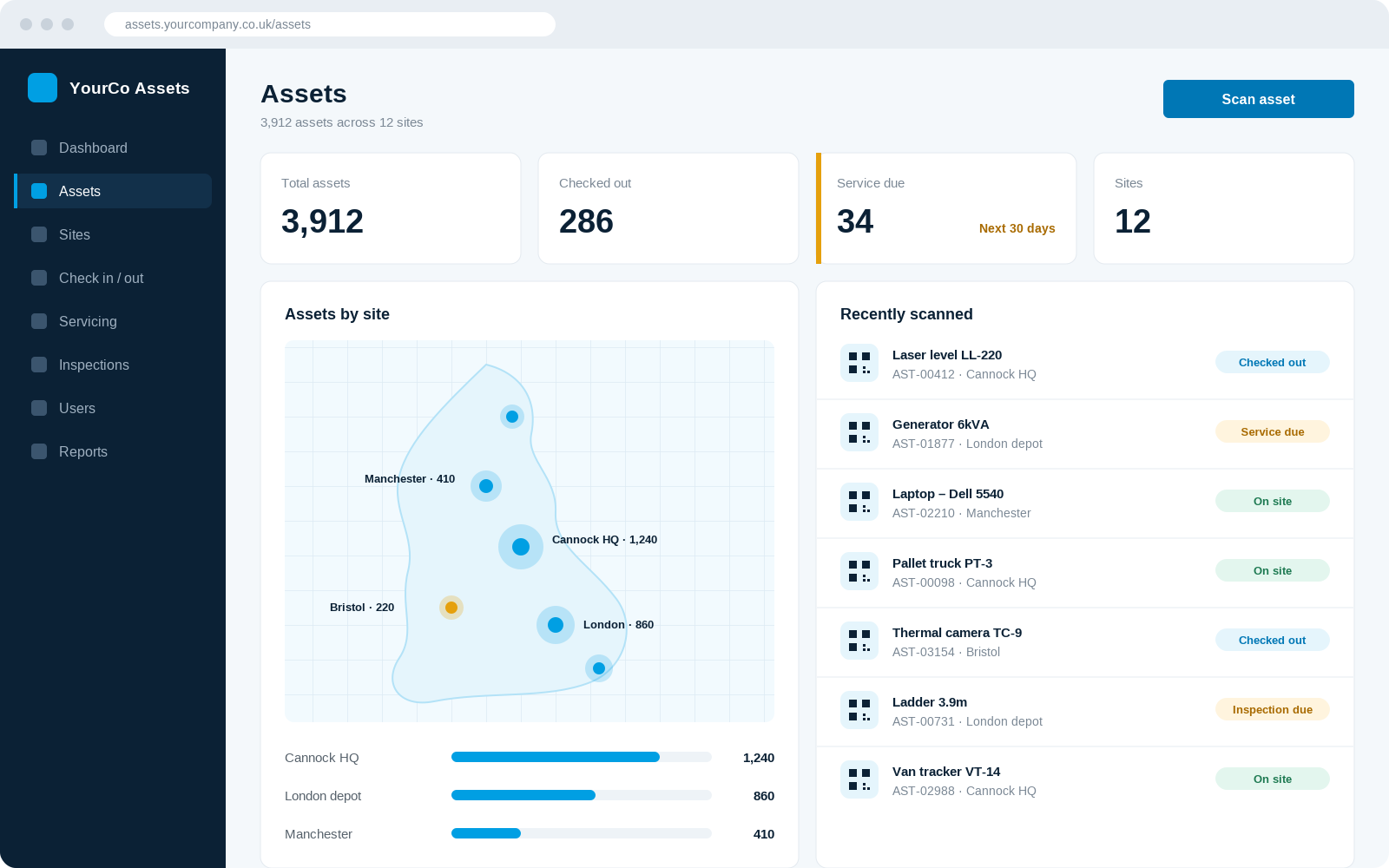
Modernisation project showing modules rebuilt and live, records migrated, and the old desktop system being retired
Phase 2 liveStock & purchasing · signed off
218,406 records migratedAll totals reconciled

Legacy Software Modernisation at a glance

Your data, safely moved

Every record migrated, checked and reconciled.

No big-bang switchover

Phased rebuilds so the business keeps running.

Secure and supported

Current technology, UK hosting and ongoing support.

Works on any device

Web-based, so your team can work from anywhere.

Is an old system holding your business back?

Many businesses rely on software that was built years ago: an Access database, a desktop application or a system written by a developer who has long since moved on. It still does the job, just about, but it only runs on one PC, can’t be used remotely, doesn’t connect to anything and gets harder to support every year.

The risks build up quietly. Unsupported platforms stop getting security updates, backups get missed and the knowledge of how it all works sits with one or two people. Patching keeps it running, but rarely fixes the real problems. Our guide to legacy software modernisation explains the warning signs and your options.

We rebuild legacy systems on current technology, around how your business works today. You keep the processes your team relies on, your data comes across safely, and you get a secure, web-based system you own outright, with no per-user fees and a team that supports it long after go-live.

Sound familiar?

The most common reasons businesses come to us to modernise.

  • A system that only runs on one office PC
  • Software or servers that no longer get security updates
  • Only one person knows how it really works
  • Data re-typed between the old system and everything else
  • Staff unable to work from home or on site
  • Rising costs to keep something old running
Talk to us about your old system

How we modernise your software

Every project is planned around your system and your business. This is how we take you from old to new without disruption.

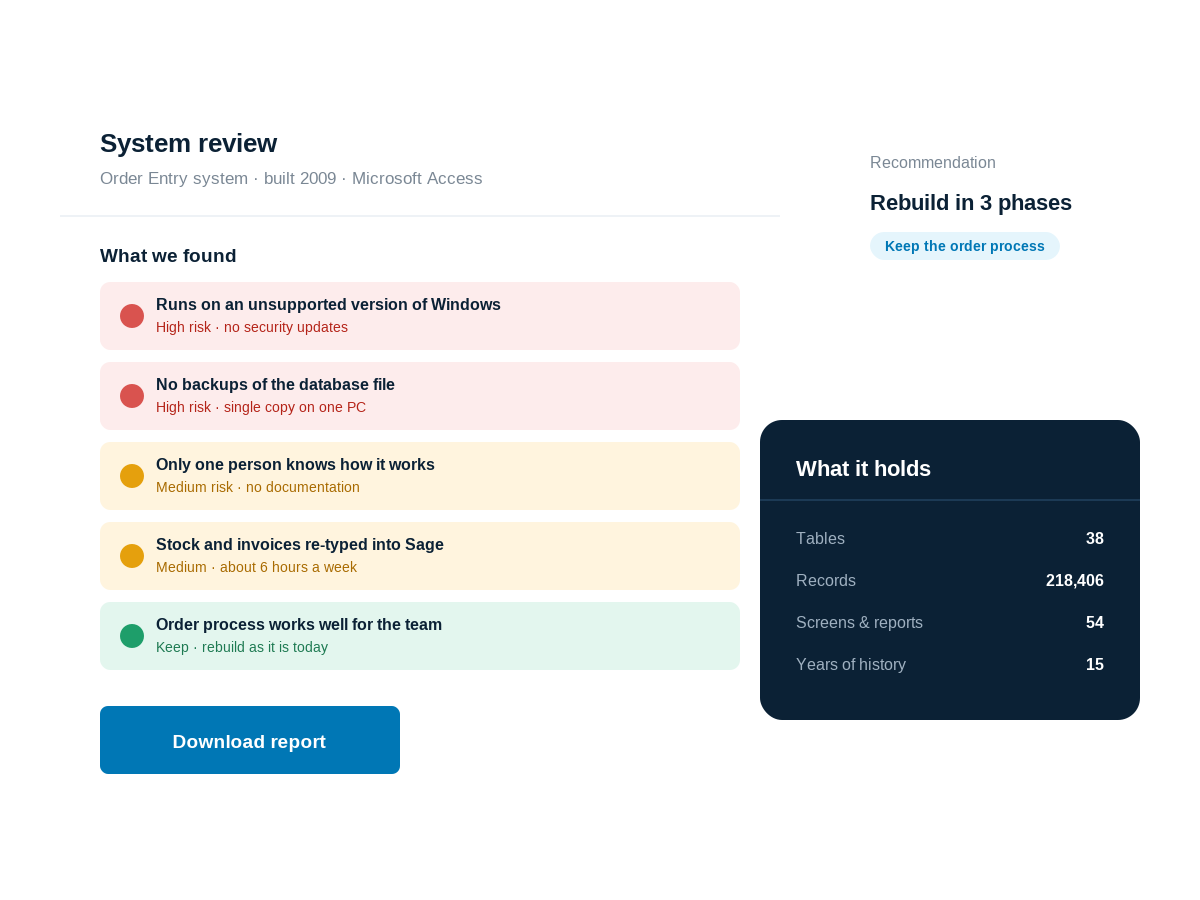
System review listing risks found in an old Access database, with a recommendation to rebuild in phases

A clear review of your current system

We start by understanding what your current system does, what it holds and where the risks are. You get a plain-English report covering what to keep, what to change and how we’d approach the move.

  • Risks, dependencies and data mapped
  • The processes your team relies on recorded
  • A recommended approach and phased plan
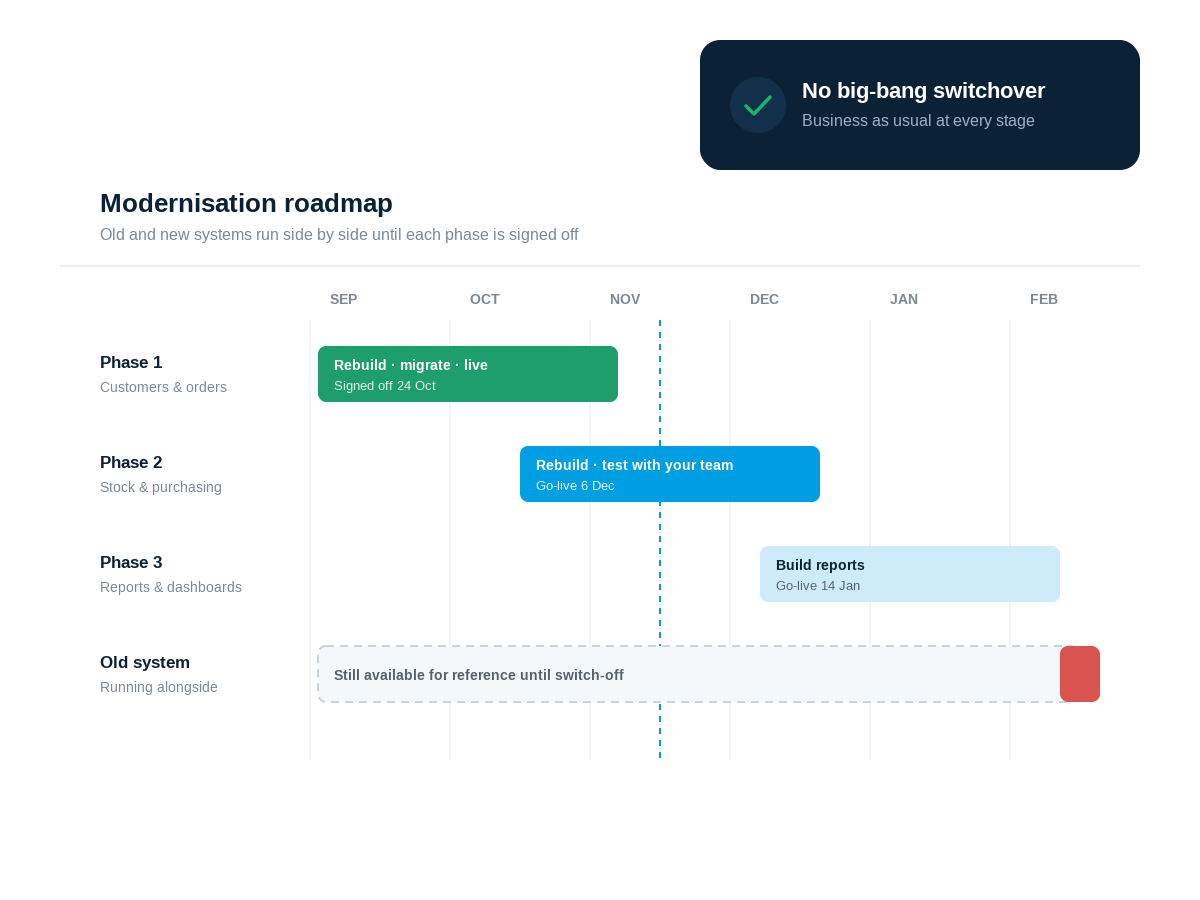
Modernisation roadmap with three phases and the old system running alongside until switch-off

A phased plan, not a big-bang switch

Most legacy systems can be replaced in phases, with old and new running side by side until each part is signed off. Your team keeps working throughout, and each phase is tested with them before it goes live.

  • Phases agreed around your busy periods
  • Old and new systems side by side
  • Each phase tested and signed off by your team
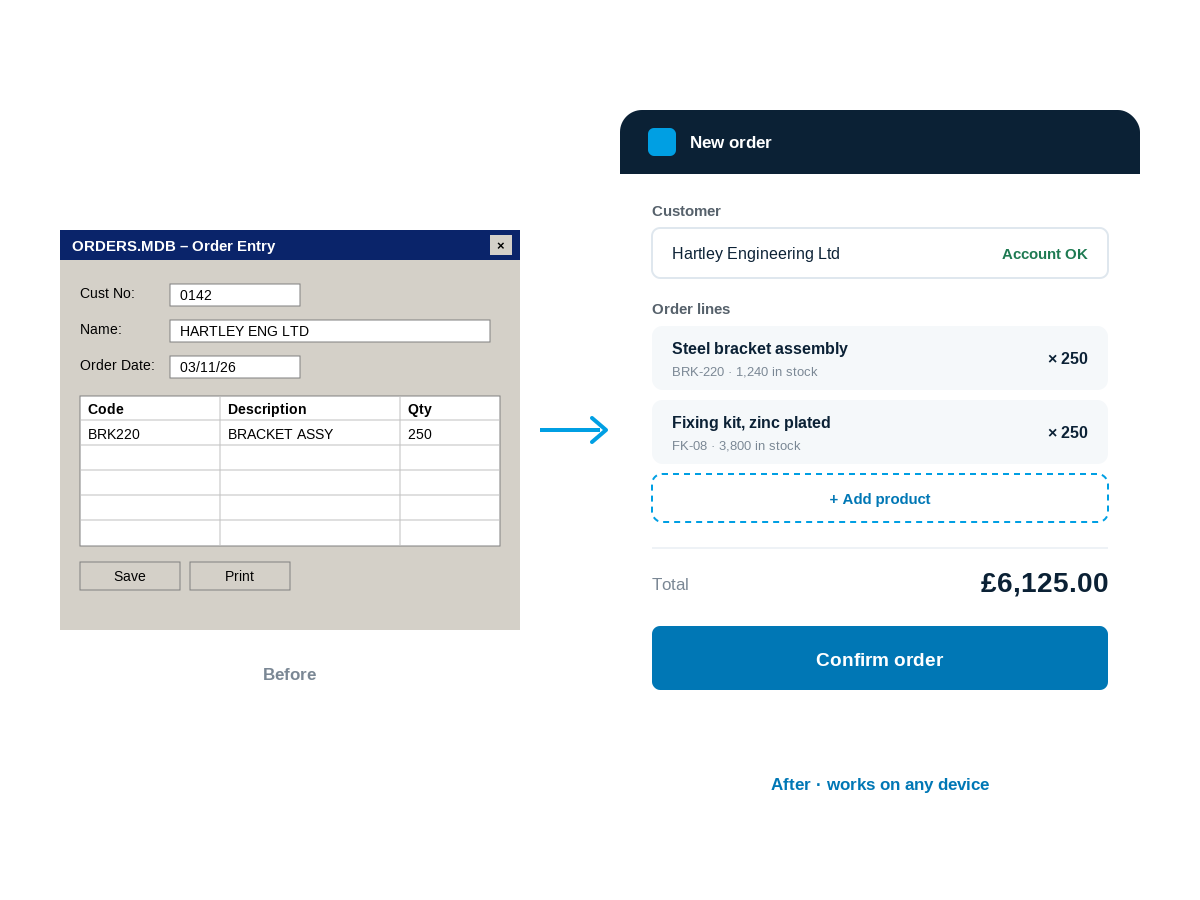
An old desktop order entry screen beside the same screen rebuilt as a modern web system

Rebuilt as a modern web system

We rebuild the system on current, supported technology, keeping the workflows your team relies on and fixing the ones that hold you back. The result is faster, more secure and works on any device.

  • Familiar workflows, modern interface
  • Secure logins and role-based access
  • Connected to the software you use today
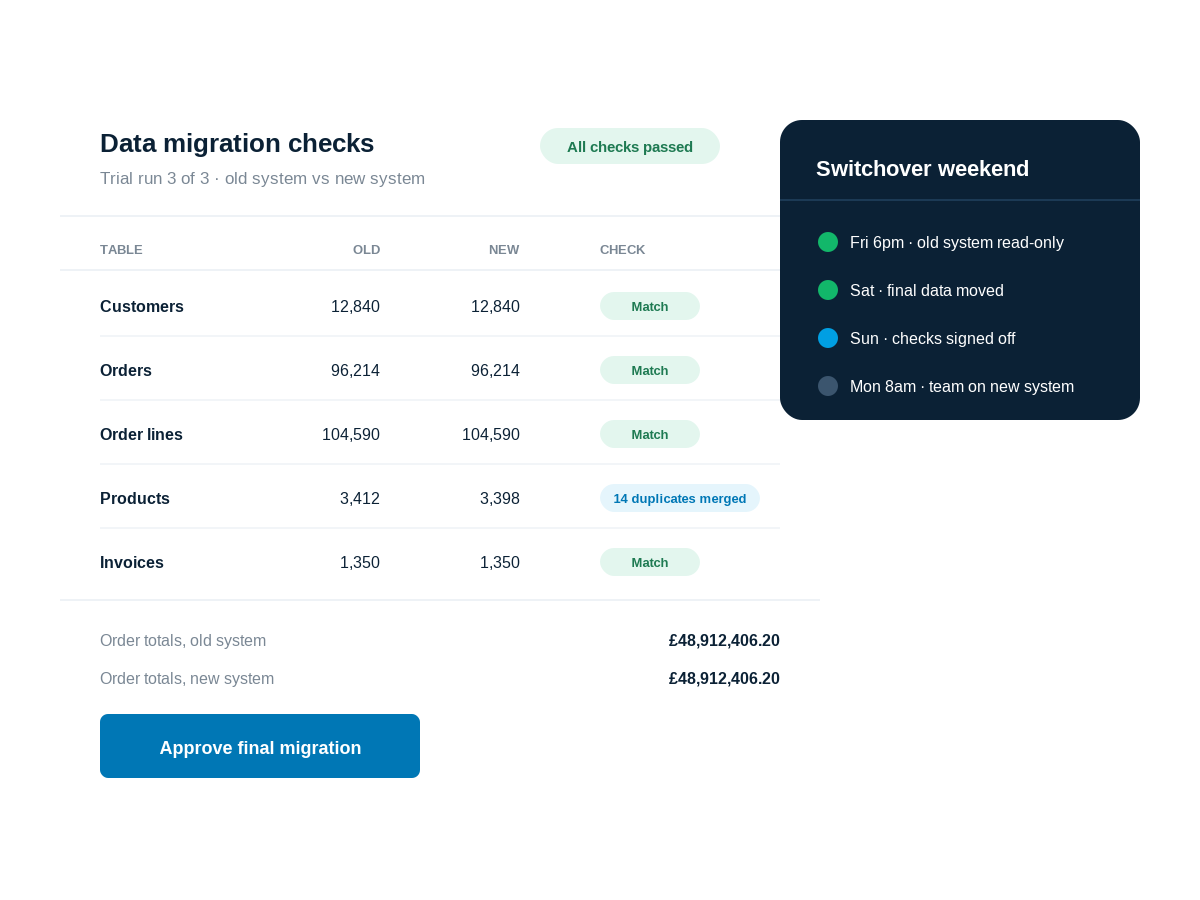
Data migration checks comparing record counts and totals between the old and new systems, with a switchover plan

Data migrated and checked

Years of records are moved across, cleaned and checked against the old system with repeated trial runs before the final switchover, so nothing is lost and the numbers match.

  • Trial migrations before go-live
  • Record counts and totals reconciled
  • Switchover planned for a quiet period

Old system to new, step by step

A phased, tested approach that keeps your business running at every stage.

  1. 1

    Review

    We map what your system does, holds and risks.

  2. 2

    Plan

    Phases agreed around how your business runs.

  3. 3

    Rebuild

    Each part rebuilt and tested with your team.

  4. 4

    Migrate

    Data moved across and reconciled.

  5. 5

    Switch over

    The new system goes live and the old one retires.

From old technology to connected software

We move your data out of the old system and connect the new one to the tools you use today, so information flows between them instead of being re-typed.

  • Access, SQL Server and desktop databases migrated
  • Links to Xero, Sage and Microsoft 365
  • Open APIs ready for future integrations
Learn about our integrations

Migrated from

Old databasesDesktop appsSpreadsheets
Your new
system

Connected to

Xero or SageMicrosoft 365Any API

Modernise or keep patching?

Keeping an old system alive can look cheaper, but the risks and hidden costs grow every year.

Keeping the old systemModernising with e20
Unsupported software with no security updatesCurrent, secure technology, UK-hosted
Only runs on one PC in the officeWeb-based, works on any device
Only one person knows how it worksDocumented, supported and easy to extend
Workarounds and re-keying between systemsConnected to the software you use today
Rising costs to keep it runningLower running costs, no per-user fees

Start with a free discovery call

Every project starts with a free discovery call and a fixed, written quote. No surprises.

  • Unlimited users included
  • No licence subscriptions
  • Free basic support
Legacy desktop database rebuilt as a secure web-based system
Case study

Legacy database modernisation

A business depended on a desktop database that only ran on one PC and that nobody could support. We rebuilt it as a secure, UK-hosted web system, moving years of records across without losing any.

  • Rebuilt as a secure, web-based system
  • Years of records migrated and reconciled
  • Accessible from any device, anywhere
Read the Case Study

Often combined with

Legacy modernisation FAQs

Common questions about rebuilding and replacing legacy software.

Still have a question?01543 624105
Should we rebuild our old system or keep patching it?

It depends on how well the system still fits your business and how much risk it carries. If it runs on unsupported technology, holds critical data or stops you growing, rebuilding usually costs less over time. We explain the trade-offs in our guide Rebuild or keep patching legacy software?

Will we lose any data?

No. We migrate every record, run trial migrations and reconcile record counts and totals against the old system before the final switchover. The old system stays available for reference until you’re happy.

Can the business keep running during the project?

Yes. Most systems are replaced in phases, with old and new running side by side until each part has been tested and signed off by your team, so there’s no big-bang switchover.

Can you modernise a system we don’t have the source code for?

Often, yes. We can work from the existing database, screens and reports, and from how your team uses the system, to rebuild it, even if the original developer or source code is no longer available.

Will the new system work the same way as the old one?

Where your current process works well, we keep it, so your team feels at home. Where it’s been holding you back, we improve it. We agree what stays and what changes before we start.

How long does a modernisation project take?

It depends on the size of the system. A small database might take a few weeks, while a large business system is usually delivered in phases over several months. You’ll get a clear timeline after the initial review.

How much does legacy software modernisation cost?

Every project is priced individually, after a review of your current system. The price depends on its size, how much data there is to migrate and what you want to improve, and it’s quoted in writing after a free discovery call.

Ready to replace your old system?

Book a free discovery call and we’ll look at your current system and how it could be modernised.